
Bank account (Sheba) and payouts
Add your Sheba number, how the account holder is checked, when income can be withdrawn and how to request a payout.
Your sales are paid into the account whose Sheba number you add in the panel. Until a Sheba number is added and confirmed, sales cannot be paid out.
Add your Sheba number
The supplier panel is in Persian for now. The pictures show it as it is; the names in this guide are their English equivalents.
- In the supplier panel, choose Add Sheba on To do today, or open Settings › Payment.
- Write the account holder’s name exactly as the bank has it.
- Enter the Sheba number: it starts with IR and has 24 digits.
- Confirm that the account is in your own name or your company’s, and save.
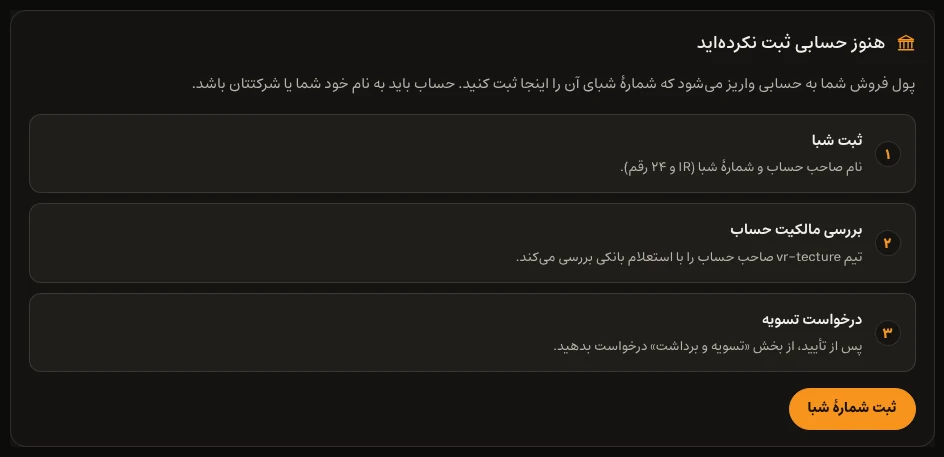
Before the first payout, vr-tecture matches the holder’s name through a Sheba inquiry at a bank. Until then the status is “Sheba in review” and payouts cannot be requested. If the name does not match the account, the bank returns the money and the payout is delayed.
When money can be withdrawn
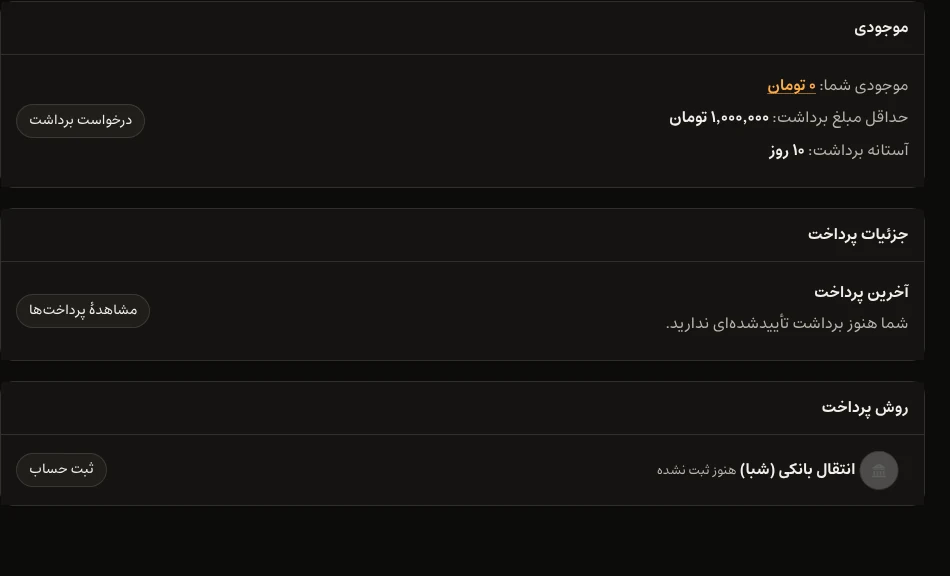
- The income of each order can be withdrawn ten days after the order is completed.
- The smallest withdrawal is 1 million Toman.
- The partner share has already been taken from the sale; Available now is your net amount.
Request a payout
- In the panel, open the payouts page from the menu. Your balance, the smallest withdrawal and the ten-day threshold are shown there.
- Press the request button beside your balance and enter the amount.
- Once the request is approved, the amount is paid to the Sheba number on file.
Change the account
You can change the Sheba number at any time. With every change of name or number the holder is checked again, and payouts pause until it is confirmed.