Supported files, sizes and units
GLB, FBX, DAE, IFC, OBJ, STL or a ZIP with textures; files up to 200 MB, optimized to 40 MB in your browser.
Upload your model with Upload GLB on a style in the tour editor. The button takes more than GLB: other formats are converted to GLB in your own browser before anything is sent.
File types
| Format | Usually from | Notes |
|---|---|---|
| GLB (glTF 2.0 binary) | Blender, 3ds Max 2023+, SketchUp with a glTF plugin, Twinmotion, Rhino 8 | Best choice: materials, textures and names come through exactly. Uploaded as it is. |
| glTF + .bin + textures | Blender and other glTF exporters | Select all the files together, or put them in one ZIP. |
| FBX | Revit, 3ds Max, Maya, Chief Architect | Converted in your browser. Embed media, or zip the FBX with its texture folder. |
| IFC (BIM) | Revit, ArchiCAD, Vectorworks, Allplan, Tekla, BricsCAD | Converted in your browser. Surfaces are named by their building element (Floor, Wall, Door, Glass…), so Suggest finishes can dress them. See Upload a BIM model (IFC). |
| DAE (COLLADA) | SketchUp, ArchiCAD | Converted in your browser. Zip the .dae with the texture folder SketchUp writes next to it. |
| OBJ + .mtl | Almost any 3D tool | Select the .obj, the .mtl and the textures together, or zip them. |
| STL | CAD and 3D printing tools | Geometry only: no colours or textures. Add materials afterwards with Finishes. |
| ZIP | Any of the above | The safest way to bring textures along: the model and all its image files in one ZIP. |
Texture images can be JPG, PNG, TGA or WebP. Native files such as .skp, .rvt, .max, .3dm or .pln cannot be read directly: export from your design tool first. See SketchUp, Revit and Blender, 3ds Max and others.
Size
- You can pick a file of up to 200 MB.
- Before upload, your browser optimizes it: textures are resized and compressed and geometry is compressed. You see Optimizing the model… and then, for example, Optimized: 148 → 22 MB.
- Each model can be up to 40 MB after optimizing. If it is still larger you see Even after optimizing it is … MB; see Get your model ready to walk for what to cut.
- All models in your studio count towards your plan’s model storage: 100 MB on Free, 1 GB on Starter, 5 GB on Studio, 25 GB on Developer. See Plans and limits.
Smaller models open faster on phones. A furnished room is usually 5 to 25 MB after optimizing.
Units and orientation
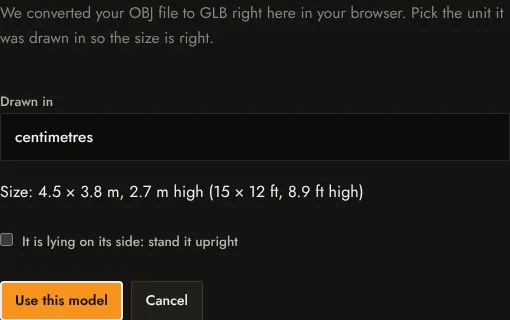
When a model is converted, the studio asks which unit it was drawn in (metres, centimetres, millimetres, inches or feet) and shows the size it reads, for example Size: 4.5 × 3.8 m, 2.7 m high (15 × 12 ft, 8.9 ft high). Pick the unit that gives the real size of the room. If the model lies on its side, tick It is lying on its side: stand it upright. Then select Use this model.
GLB files are always in metres by definition, so they skip this step.
Missing textures
If the converter cannot find some image files the model refers to, it tells you how many are missing and their names. To keep them, upload the model and its textures together in one ZIP. See Upload and conversion problems.