
Create your account and sign in
Sign up free, confirm your email, sign in on any device and reset a forgotten password.
The free plan needs no card. You can build one tour, share it and receive requests before you decide on anything else.
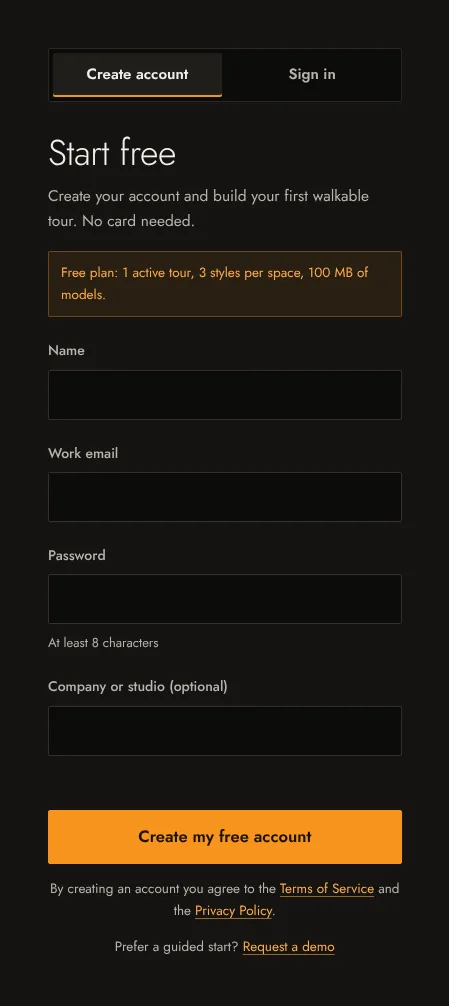
Create your account
- Open your studio. If you are not signed in, it shows the sign-up form.
- Under Create account, enter your name, your work email and a password of at least 8 characters. Your company or studio name is optional.
- Select Create my free account. You are signed in straight away and land in your studio.
Confirm your email
We send a confirmation link to the address you signed up with. Until you open it, your studio shows a note: Confirm your email address to receive client requests by email. You can build and share tours before you confirm, but request emails only go to a confirmed address. If the email does not arrive, check your spam folder, then use Resend the email in that note.
A confirmation link works once. If you see That confirmation link is no longer valid, use Resend the email to get a new one.
Sign in
Use Sign in on the studio page or in the site header. Tick Keep me signed in on this device on your own computer; leave it off on a shared one. To sign out, use Sign out in the header or under Account in the studio.
Forgot your password
- On the sign-in form, select Forgot your password?
- Enter your email and select Send the link. For your security we always answer the same way, whether or not the address has an account.
- Open the link in the email, choose a new password and select Save the new password. Then sign in with it.
A reset link is valid for a limited time. If it has expired, ask for a new one.
Change plan or close your account
Plans are described in Plans and limits. To change your account email or to close your account, contact support from the address on the account.