
Start from a ready-made space
Furnished rooms with realistic light and client choices, to demo vr-tecture or to learn the studio.
Two furnished rooms are ready to use in every studio: a Condo living room and a Kitchen with island. Each has realistic light, three styles and many client choices with prices. Use one to show a client how a vr-tecture tour feels before their own project is modelled, or to learn the studio.
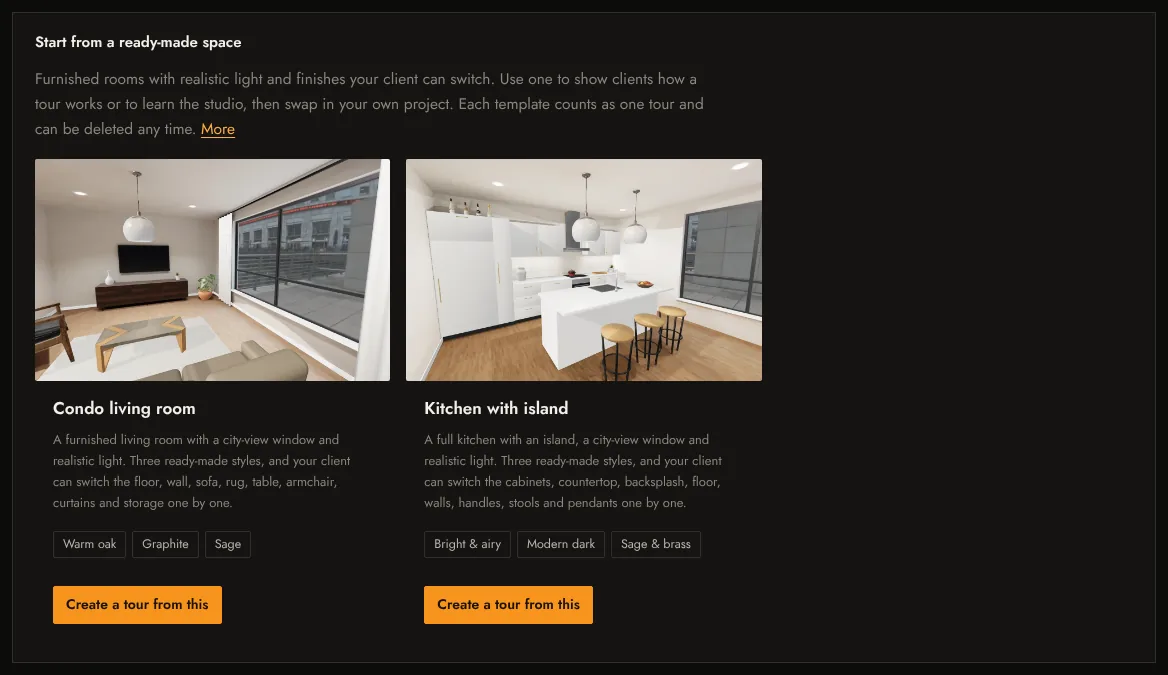
Create a tour from a template
- Open the Tours tab of your studio and scroll to Start from a ready-made space.
- Select Create a tour from this on the room you want.
- After a few seconds the tour is ready and the share window opens with its link and QR code.
What you get
- Condo living room: the floor, walls, sofa, rug, table, armchair, curtains and storage can each be switched by your client.
- Kitchen with island: cabinets, worktop, backsplash, floor, walls, handles, stools and pendants can each be switched.
- Three ready-made styles each (Warm oak, Graphite, Sage; Bright & airy, Modern dark, Sage & brass).
The tour is yours to change: rename it, edit prices in Finishes, add your own space next to it, or replace a style’s model with your project.
Note
A tour made from a template counts as one active tour on your plan. Delete it any time from its card.
Related: Client choices and prices, Share link, QR code and embed.