Put your brand on your tours
Your studio name, logo and colour in every tour, and no vr-tecture credit on Studio and Developer.
On Starter and above, your tours carry your studio’s name, logo and colour instead of vr-tecture’s. On Studio and Developer, the small “Made with vr-tecture” credit is removed too, so the tour is entirely yours.
Set your brand
- In your studio, open Account and find Your brand in tours.
- Type your Studio name.
- Pick your Accent colour, or type its hex code, for example
#1f6f5c. - Select Upload logo: PNG, JPG or WebP, up to 512 KB and at least 16 pixels wide. A wide logo on a transparent background works best.
- Check the Preview and select Save brand.
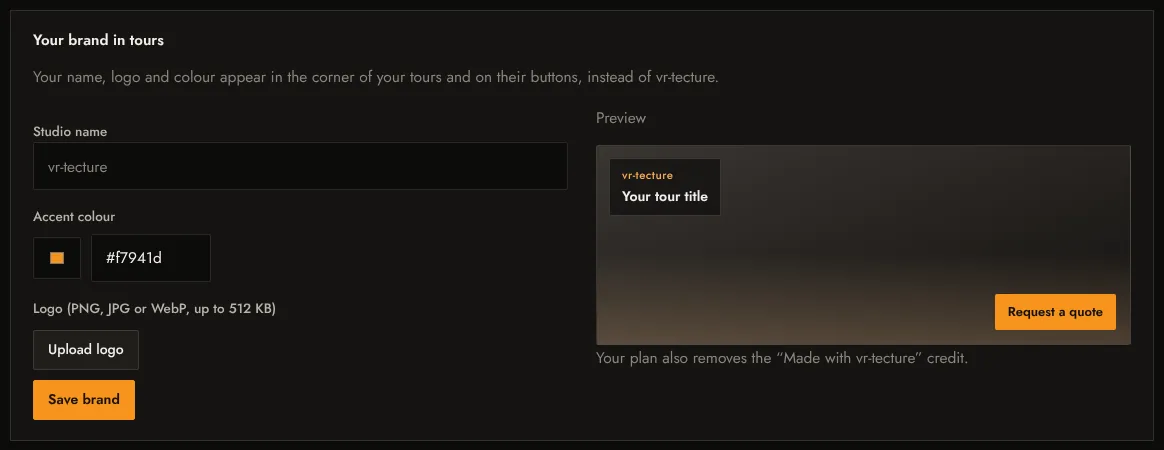
The brand applies to all your tours at once, including ones you already shared. Remove logo takes the logo off again.
What changes in the tour
- Your logo and name in the top corner, above the tour title.
- Your accent colour on the main buttons, such as Request a quote, and on highlights.
- On Studio and Developer, no “Made with vr-tecture” credit.
Teams
In a team, only the studio owner can change the brand; colleagues see The studio owner manages the brand. See Invite your team.
On the free plan this card explains which plans include it. See Plans and limits.