
Short answer: vr-tecture does not replace Enscape. Enscape is a real-time renderer that lives inside your design tool and produces images, videos, panoramas and standalone walkthroughs. The two overlap at one moment: when the design leaves your office and goes to a client. If you want the client to compare priced options and tell you what they chose, a decision tour fits better. For everything about image quality while you design, Enscape is the right tool, and many studios use both.
What Enscape gives you
- Rendering inside the design tool. Enscape plugs into SketchUp, Revit, Rhino, Archicad and Vectorworks and updates as you model.
- Several ways to share. Renders and panoramas; a web standalone that opens in a browser from a link; and an executable standalone for Windows that keeps full quality and works in VR.
- Review in Chaos Cloud. Cloud collaboration is included in the Solo plan and above. Images, panoramas and web standalones are sent to Chaos Cloud, where clients comment, annotate and formally approve in a browser with no extra software. Chaos Cloud also offers virtual tours with floor plans, 3D streaming of full scenes, and review of PDF drawings next to the visuals.
What a decision tour adds
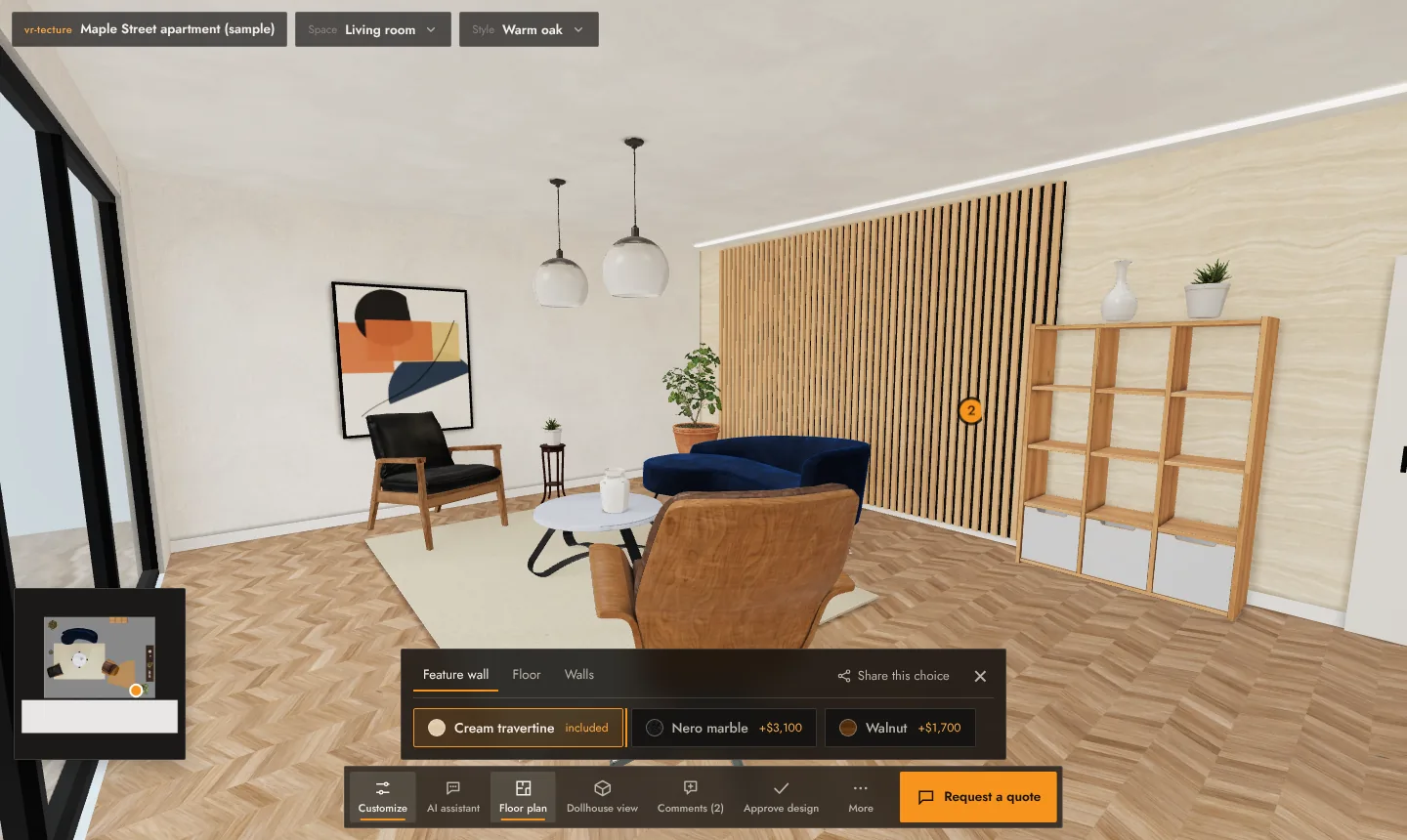
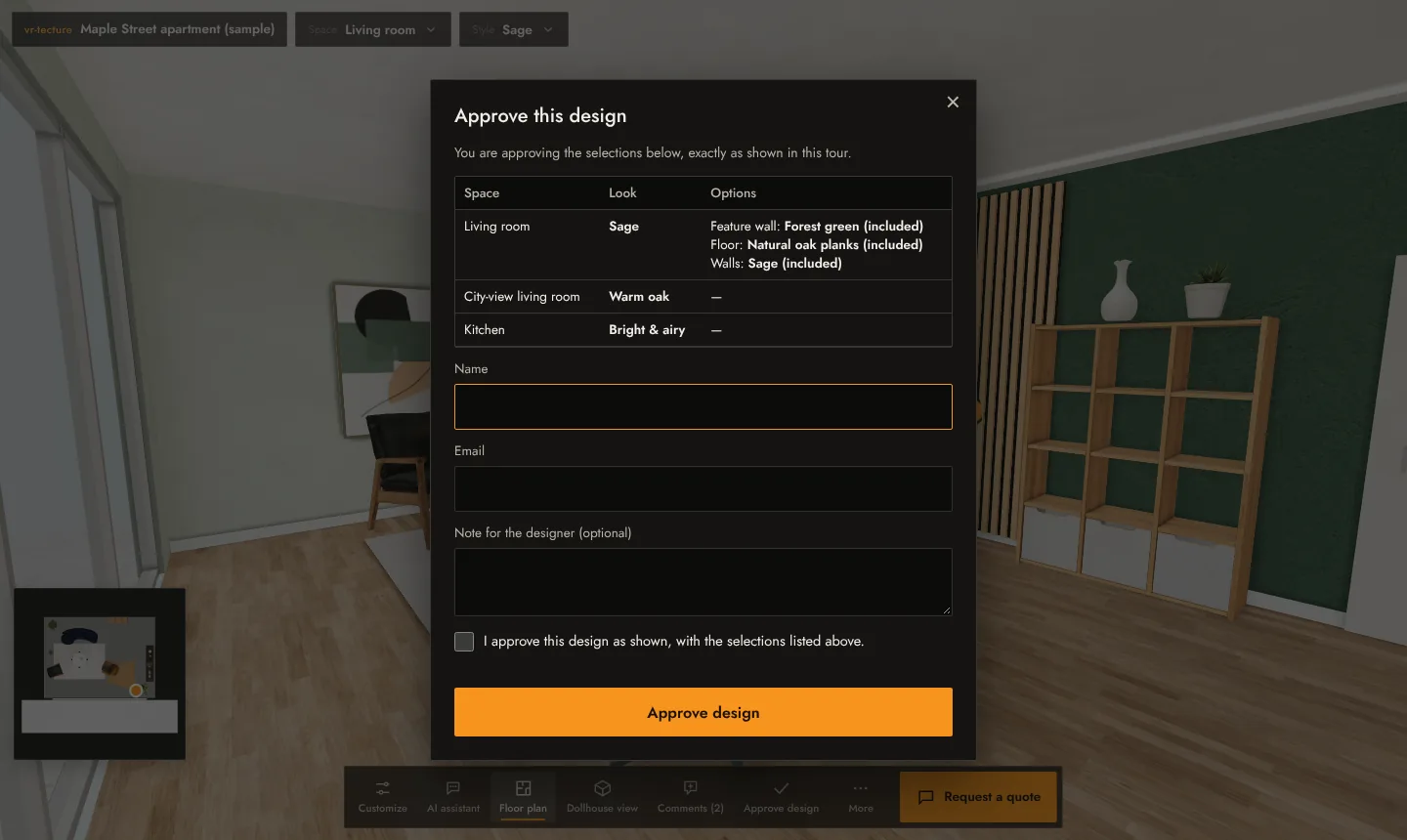
In vr-tecture the review is built around choices. You prepare two or three finish or furniture options for a surface and attach a price to each. The client switches between them in the same room, sees the difference in cost, and sends you the selection or asks for a quote. Comments are pinned to the model, and the approval is recorded with its date and the selections it covers.
Tours are published with free plugins for SketchUp, Revit, Blender, 3ds Max and Rhino, which are in public beta, or by uploading GLB, FBX or IFC files.
Side by side
| Enscape with Chaos Cloud | vr-tecture | |
|---|---|---|
| Main purpose | Real-time rendering while you design | Client review and decision |
| Runs on | The designer’s computer and graphics card | A browser; the tour is drawn by the client’s device |
| What the client opens | A link to images, panoramas or a web standalone; or a Windows program file | A link to a walkable tour |
| Client switches priced options | Not part of the exports, as far as its documentation describes | Yes |
| Comments and approval | Yes, in Chaos Cloud, with a review board and statuses | Yes, inside the tour, with a dated record |
| Drawings (PDF) in the same review | Yes | No |
| Still images and video for marketing | Yes | No |
| Works from | SketchUp, Revit, Rhino, Archicad, Vectorworks | SketchUp, Revit, Blender, 3ds Max, Rhino (beta); GLB, FBX, IFC |
| Free plan | No | Yes, one active tour |
What each costs
Enscape is sold as a named licence billed yearly: Solo at $47.90 a month, Premium at $55.90 and Collection at $60.90, before tax. A 20% promotion was running on the day we checked. You also need the design application it plugs into and a capable graphics card.
vr-tecture has a Free plan with one active tour. Paid plans are listed at $9 (Starter, 3 active tours), $29 (Studio, 15 tours and 3 team seats) and $79 (Developer, 60 tours and 10 seats) a month in US dollars. They are not open for purchase yet; until they are, every account runs on Free.
How to choose
- You need images, video or the best real-time picture: Enscape.
- You need a client to see the space and nothing else: Enscape’s web standalone or panoramas already do this.
- You need a client to choose between options with prices, and a record of what was agreed: a decision tour such as vr-tecture.
- You need both: render in Enscape, and publish the same model as a tour for the review meeting.
See also presenting an interior design with fewer revision rounds, or walk the demo tour.
Common questions
Does vr-tecture look as good as Enscape?
No, and it does not try to. A tour drawn on a phone uses simpler lighting than a renderer on a desktop graphics card. Its purpose is a decision, not a portfolio image.
Can I use my Enscape model?
You use the same design model. Publish it from SketchUp, Revit or Rhino with the vr-tecture plugin, or export it as FBX, GLB or IFC. Enscape’s own materials and lights are not carried over.
Does the client need a graphics card?
Not for a browser tour or for Enscape’s web standalone. Enscape’s executable standalone needs a Windows computer with a capable graphics card.
Prices and features of Enscape are taken from its own website as it stood on 24 November 2026; they change, so check there before you decide. Enscape is a trademark of its owner. vr-tecture is not affiliated with or endorsed by it.